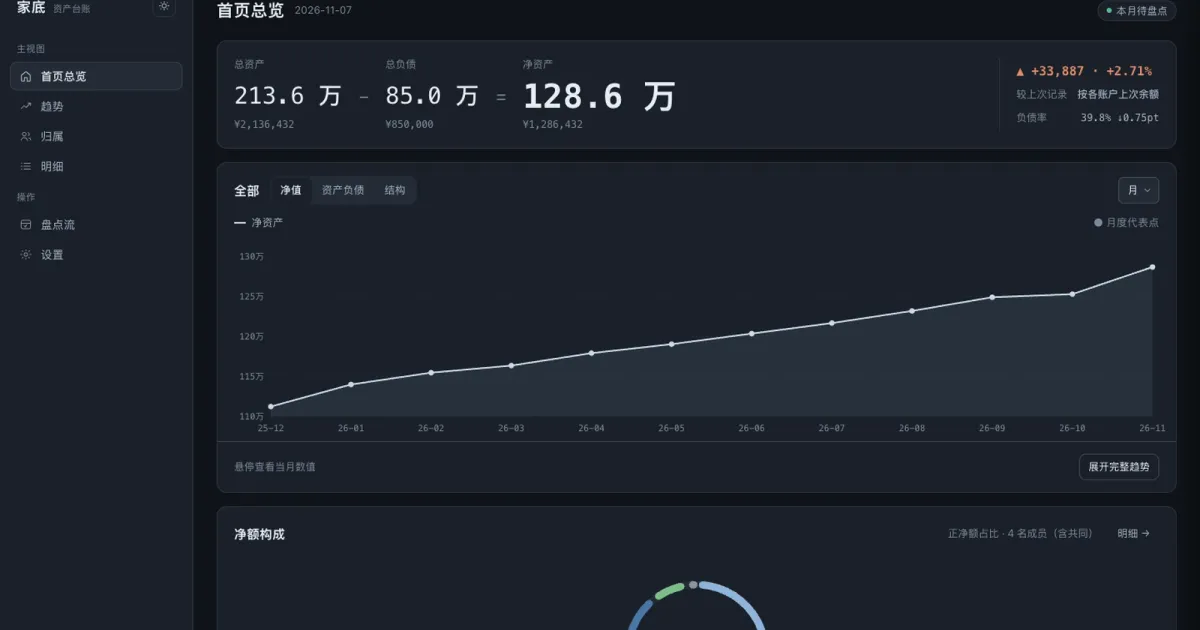
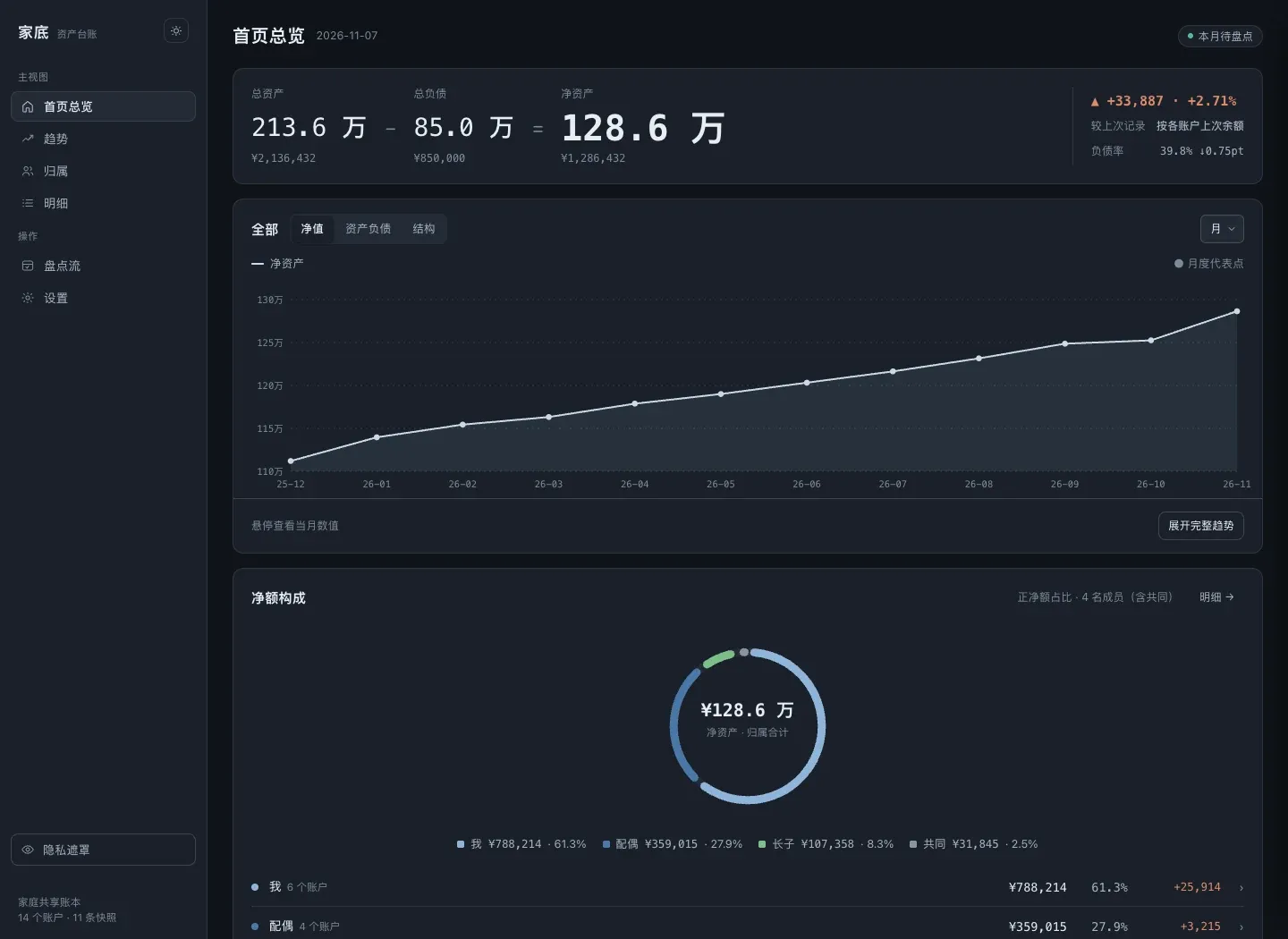
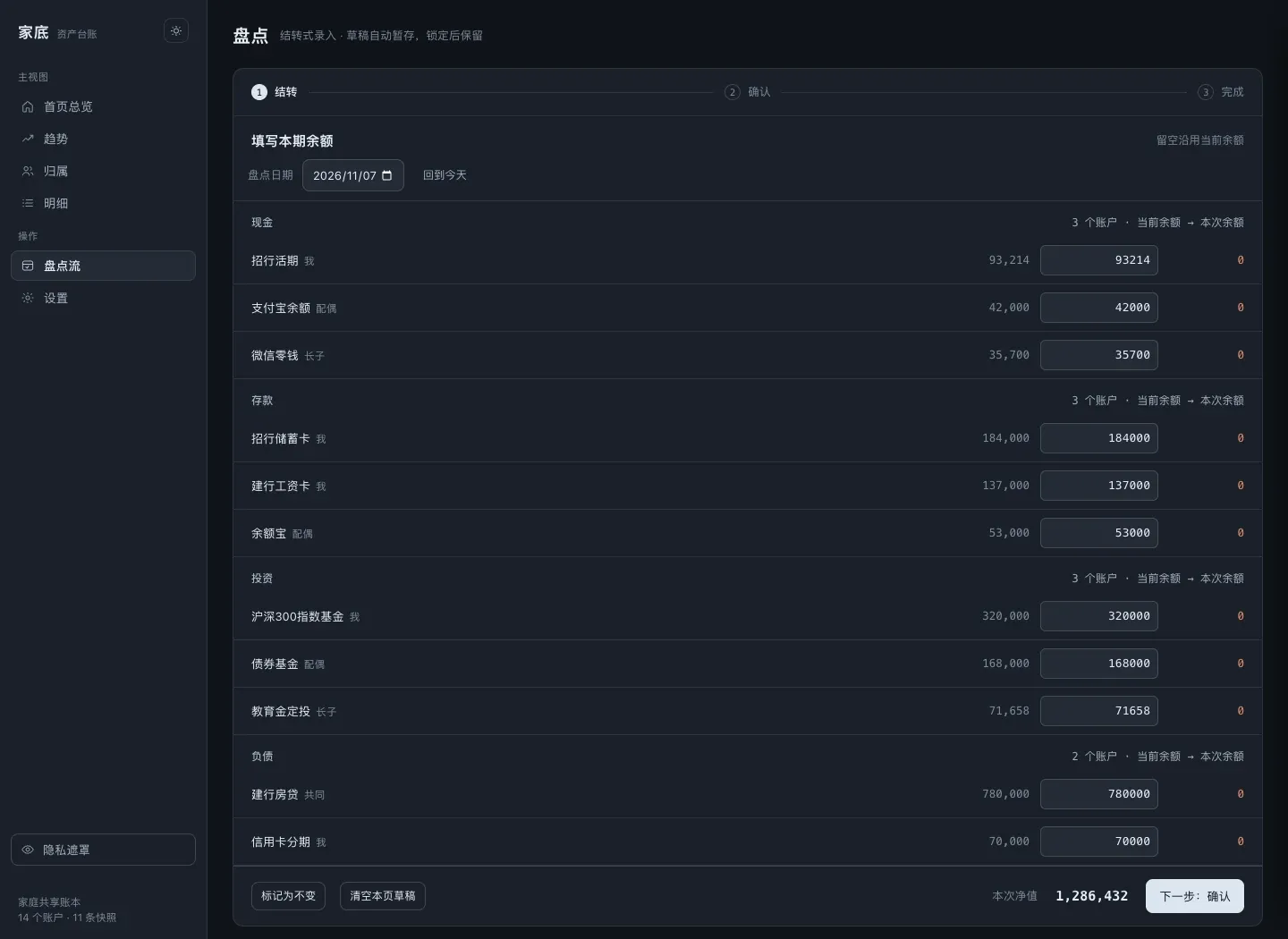
Accounting software asks “where did this money go”. Jiadi, Chinese for “family assets”, asks “how much is in the house right now”. No transaction list, just a check-in on a fixed cycle.
Node 22, zero third-party dependencies, MIT. The server is server.mjs at 484 lines, domain validation is ledger-domain.mjs at 61, the browser side is shared-client.js at 208. This post covers how data gets in, how it’s validated, how it stays intact, and the handful of traps I had to deal with myself.
Environment and code size
| Item | Value |
|---|---|
| Runtime | Node.js ≥ 22 (native node:fs/promises, node:crypto, ESM) |
| Dependencies | Zero third-party packages; you never run npm install |
| Shapes | fnOS micro app (fpk, over the gateway socket) / Docker (compose.yaml) / node server.mjs |
| Code | server.mjs 484 lines, ledger-domain.mjs 61 lines, shared-client.js 208 lines, single-file frontend |
| Storage | data/ledger.json (the one source of truth) + backup/ + .jiadi-keep/ at the volume root |
| Frontend | No build step: change a line, refresh, done |
server.mjs 单进程 HTTP 服务:路由、锁、原子写、会话、加解密、备份ledger-domain.mjs 纯领域函数:normalizeData() 等,可在浏览器与服务端共用shared-client.js 前端共用逻辑(取数、格式化、隐私遮罩)jiadi-ui.html 主界面(单文件)fnos/ manifest / wizard / cmd:安装向导与生命周期脚本website/ 官网(静态单页)docs/ ACCEPTANCE.md + screenshots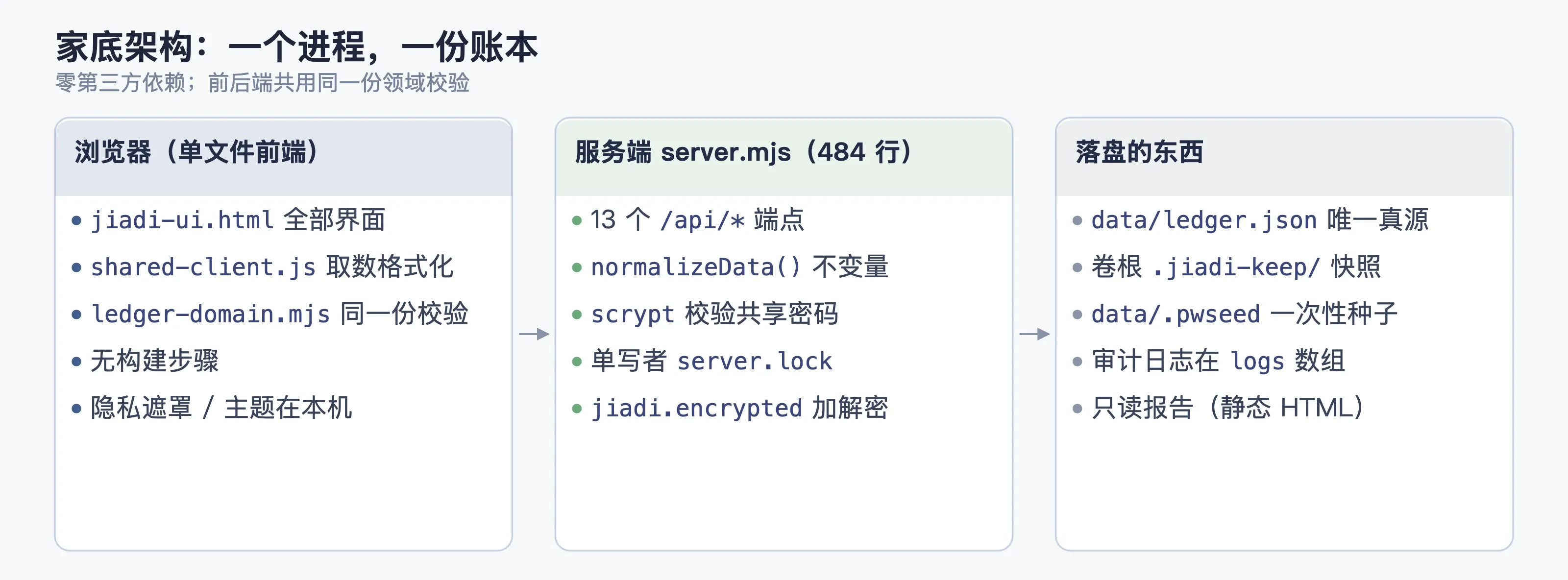
Four constraints set the shape
| Constraint | Direct consequence |
|---|---|
| A ledger is the most private data you own | No bank connections, no cloud, nothing leaves the LAN; exports encrypted by default |
| It sits on a NAS at home for years | Zero dependencies (nothing to break on upgrade), one process, one ledger file |
| The family reads it, on phones and desktops | One HTTP service, one responsive page for everyone |
| The user isn’t an accountant | Input is a single balance per account; the measures are hard-coded, no toggles |
Validation: every write goes through one gate
normalizeData() isn’t casual input checking. It’s the single definition of the domain invariants, and the server, imports and restores all go through this one copy:
const money = (v, label, max = 1e12) => {
  if (typeof v !== 'number' || !Number.isFinite(v) || v < 0 || v > max
      || Math.round(v * 100) / 100 !== v)          // 恰好两位小数,多一位都拒
    fail(label + ' 必须是范围内的有效非负金额(最多两位小数)')
  return v
}
const date = (v, label, empty = false) => {
  if (empty && v === '') return v
  const parsed = /^\d{4}-\d{2}-\d{2}$/.test(v) ? new Date(v + 'T00:00:00Z') : null
  if (!parsed || parsed.toISOString().slice(0, 10) !== v)   // 往返不一致即非法
    fail(label + ' 不是有效日期')
  return v
}
Dates are judged by whether they survive a round trip, which is stricter than a regex: 2026-02-30 passes the regex, new Date rolls it to March 2, and the round trip gives it away.
Other things it rejects outright: a category outside the Cash / Deposits / Investments / Fixed assets / Debt whitelist; a category that disagrees with isDebt; an account whose member doesn’t exist (member names are unique, colors have to be six hex digits); a history entry dated after the account’s own data. History gets sorted on the server, not in the frontend.
A failure returns 400 with a specific reason, never a silent correction. That one layer catches most of the “I imported a hand-edited CSV and wrecked my ledger” incidents.
Writing to disk: single writer, atomic replace
One data directory, one writer. The lock is server.lock, created with O_EXCL and holding the PID:
async function acquireLock() {
  try {
    const fh = await open(lockPath, 'wx', 0o600)
    await fh.writeFile(String(process.pid)); return fh
  } catch (e) {
    if (e.code !== 'EEXIST') throw e
    const pid = parseInt(String(await readFile(lockPath, 'utf8')).trim(), 10) || 0
    let alive = false
    if (pid > 0 && pid !== process.pid) {
      try { process.kill(pid, 0); alive = true }
      catch (err) { alive = err && err.code === 'EPERM' }   // EPERM = 存在但没权限,也算活着
    }
    if (alive) throw new Error('数据目录已被占用(PID ' + pid + ' 仍在运行)')
    await unlink(lockPath)                                  // 僵尸锁:持有者已死,直接接管
    const fh = await open(lockPath, 'wx', 0o600)
    await fh.writeFile(String(process.pid)); return fh
  }
}
Why the zombie-lock takeover is in there: NAS power cuts and timed-out docker stop leave lock files behind. Without a liveness check on whoever wrote it, the user has to SSH in and delete a file by hand, which is the last piece of sysadmin work a family app should ever ask for.
The ledger write itself is temp + rename + fsync, so a failed write leaves ledger.json at its last good version. You never get half a JSON.
Destructive operations take their own route. Importing a ledger, restoring the demo, clearing everything: each one copies the current ledger to .jiadi-keep/ at the volume root first.
const keepDir = join(dataDir, '..', '..', '..', '.jiadi-keep')   // dataDir = <卷>/@appdata/<app>/data
await mkdir(keepDir, { recursive: true, mode: 0o700 })
await writeFile(join(keepDir, `ledger-before-${tag}-${stamp}.json`), current)
Going three levels up to the volume root instead of staying in data/ is deliberate. Uninstalling the app wipes @appdata and the safety copy would go with it. The volume root matches the intuition that “my stuff lives on this disk”.
Auth: one shared password, four gates
A household has no account system, only a shared password:
| Stage | How |
|---|---|
| Storage | scrypt(N=32768, r=8, p=1, maxmem=64MB) derives 32 bytes; stores salt (16B hex) plus hash; compares with timingSafeEqual |
| First setup | The wizard’s password comes in through cmd/install_callback, which writes only data/.pwseed (0600); the server turns it into a vault on startup and deletes the file |
| Sessions | Login cookie; 15 minutes idle locks it (JIADI_IDLE_LOCK_MS overrides it, handy for testing) |
| Micro app gateway | Unix socket plus the gateway prefix; identity comes from passthrough headers like x-trim-userid |
// 网关头只在显式信任网关时才读,否则一律走正常登录
function readGatewayIdentity(headers, trustGateway) {
  if (!trustGateway) return null
  const uid = String(h['x-trim-userid'] || '').trim()
  if (!uid) return null
  return { uid, username: ..., isAdmin: ... }
}
Locked and logged out are two different states. Locking keeps the session and asks for the password again, which is the shared-tablet case: nobody flips through the ledger on the coffee table. Logging out destroys the session.
Backups: encrypted container, two KDFs on read
Export isn’t a JSON copy. It’s real encryption:
format: jiadi.encryptedv: 1kdf: scrypt-N32768-r8-p1 | pbkdf2-sha256-210000cipher: aes-256-gcmsalt: 16B iv: 12B tag: 16B data: <密文>- Two KDFs on read, one on write: early versions used PBKDF2-210000, later ones scrypt. Old backups still open after an upgrade, but no new weak ones get written;
- Format fields get checked before decryption: any mismatch in
format / v / kdf / cipheris an immediate 400. No guessing; - Password length caps at 128, so a giant paste can’t turn the KDF into a CPU bomb.
The measures are hard-coded
Jiadi deliberately ships no switch for its statistics. Give a household ledger configurable measures and two people see two numbers, then they start arguing:
- Debt ratio = total debt / total assets, no net-debt-ratio switch;
- Unknown isn’t zero: an account with an unknown balance drops out of the totals, and the UI says “known part plus coverage” instead of counting it as 0 and pulling net worth down;
- Debt shows up in the main view: if anything is still owed, Home says so; it doesn’t hide on a second page;
- A snapshot is a historical fact: each check-in writes
{month, A, L}, and no later change of measure is allowed to recompute it.
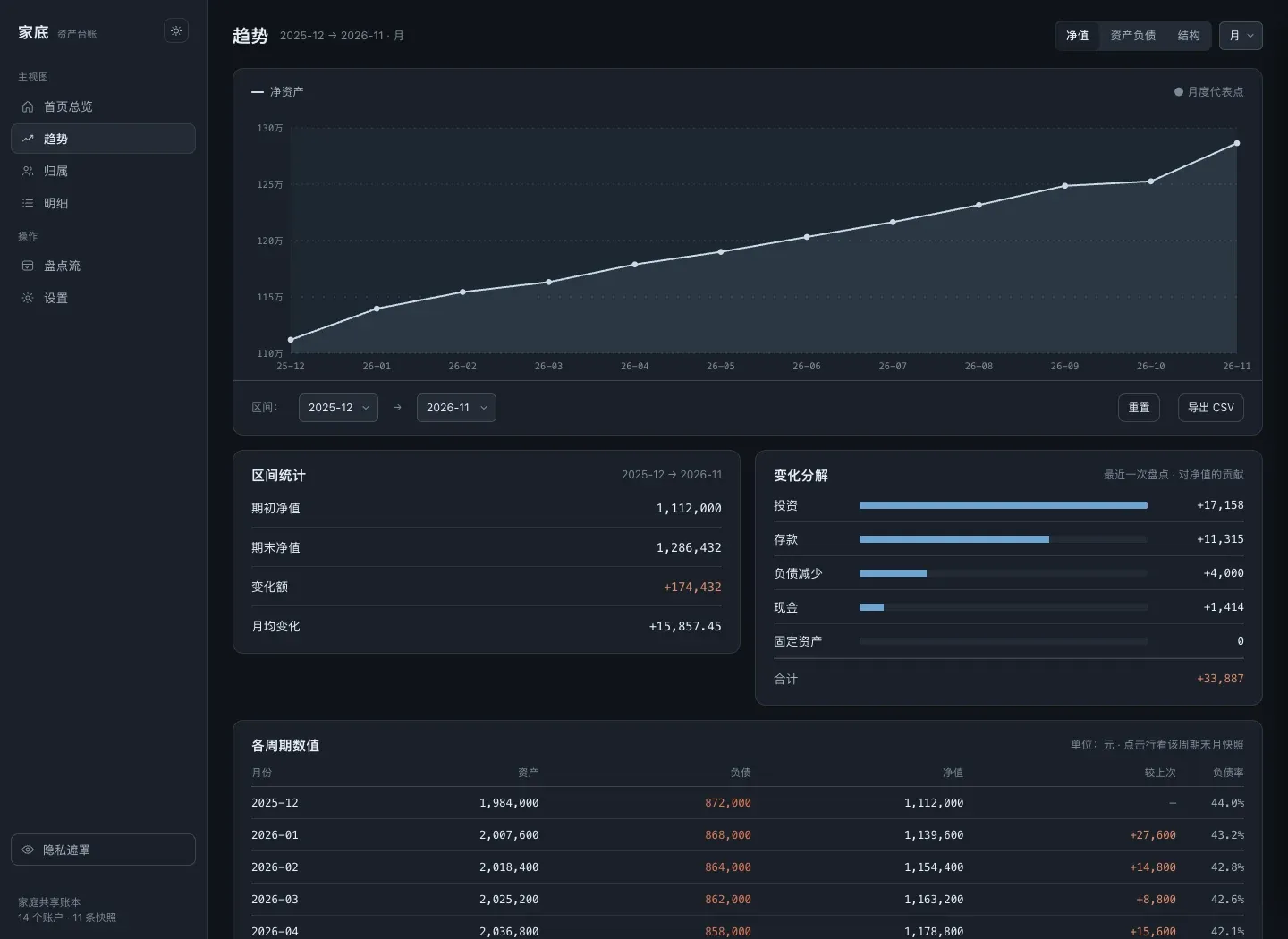
Trends, per-person ownership and category breakdown are all derived views computed over those snapshots plus account detail. Nothing extra is persisted, so there is only one truth.
API surface
Thirteen endpoints, all JSON:
| Endpoint | Purpose |
|---|---|
GET /api/ledger | Fetch the ledger (only a skeleton while locked) |
GET/POST /api/session, /api/login, /api/logout, /api/unlock, /api/lock | Session and unlock |
POST /api/setup | First password (writes the vault) |
POST /api/password | Change password |
POST /api/draft | Check-in draft (never touches the ledger until submitted) |
POST /api/verify | Validate an import or backup payload |
POST /api/export, /api/decrypt | Encrypted export, decrypt an import |
GET /api/log | Audit log (the logs array in ledger.json) |
Traps I hit
| Symptom | Root cause | Fix |
|---|---|---|
| Data directory was 755, so other containers and accounts could read it | mkdir(..., { mode: 0o700 }) only applies at creation, and the installer had already created the directory | Run chmod(dataDir, 0o700) again on startup, and carry on if it fails |
| After a NAS power cut the service won’t start, complaining the data directory is in use | I treated an existing lock file as proof of a live process | Read the PID and probe it with process.kill(pid, 0); EPERM counts as alive; take over a dead lock |
| Import or restore overwrote the ledger and there was no way back | Nothing was copied before the overwrite | Destructive operations write .jiadi-keep/ledger-before-<operation>-<time>.json to the volume root first |
| Old backups wouldn’t decrypt after an upgrade | Swapping the KDF dropped the read path | Decrypt accepts both PBKDF2-210000 and scrypt; encrypt writes scrypt only |
| Net worth dropped whenever a balance was unknown | Unknown was being handled as 0 | Unknown stays out of the totals, and the UI states coverage (“unknown isn’t zero”) |
| On Safari, anchors landed 300px off and icons disappeared on dark backgrounds | The sticky header height wasn’t part of the anchor math, and the icons used the same color as the background | Offset anchors by the header height, outline the icons, and eyeball them on dark backgrounds (it’s a README checklist item now) |
Shipping and trade-offs
| Shape | How it runs | What it’s for |
|---|---|---|
| fnOS micro app (fpk) | Installed in the app center, over the gateway socket | Always-on NAS at home, the whole family uses it |
| Docker | Ships compose.yaml + Dockerfile | Any container host |
| Plain Node | node server.mjs | Local trial run, zero dependencies, just start it |
| Choice | Alternative | Why not |
|---|---|---|
| Check-in model (balances only) | Double-entry, transaction logs | Bookkeeping cost decides whether it gets used at all; when a balance doesn’t reconcile, people go read their transactions anyway |
| Zero-dependency Node | Express + SQLite + a frontend framework | A household app has to live for years, and fewer dependencies means fewer upgrade-day failures |
| Single-file ledger + atomic writes | A database | The scale is dozens of accounts times dozens of check-ins. A file is enough, and you can read it and back it up directly |
| Shared password | Multi-user accounts with permissions | A household is a handful of people; multi-user is designed to keep family out, which is the wrong direction |
| Encrypted export | Plaintext JSON export | A ledger that lands in a group chat or a cloud drive is a leak, so exports are encrypted by default |
Known limits: no multi-user or permission isolation (one shared password); no concurrent writes (single-writer lock); trends only at month and year granularity; the read-only report is static HTML with no interaction.
Where to get it
- Site and docs: sunanang.github.io/jiadi
- Installers (fpk / Docker): github.com/Sunanang/jiadi/releases
- Source (MIT): github.com/Sunanang/jiadi
- How to use it (setup, check-in and backup, start to finish): How to use Jiadi: from first setup to the monthly check-in